How ChatGPT Canvas Helps Solopreneurs Create and Refine Content Easily

ChatGPT Canvas is a great feature in ChatGPT that helps solopreneurs streamline their content creation process even more that just by simply using ChatGPT. Picture having a workspace right inside ChatGPT where you can tweak, revise, and edit long-form content without the clutter of back-and-forth messages. Sounds great, right?
I’m Irena from The SoloGenius. I help female solopreneurs make business easy with ChatGPT, so you can enjoy more freedom and less fuss.
I’ve been testing ChatGPT Canvas and I think you’re going to love it, especially if you work on long-form content like blog posts, newsletters, or even big projects like creating online courses.
In this blog post, I’ll show you what ChatGPT Canvas is, how it works, and why it could make a huge difference in how you use ChatGPT to grow your small business.
What is ChatGPT Canvas?
ChatGPT Canvas is a special workspace in ChatGPT where you can edit, tweak, and revise your content, without overcrowding your chat.
Think about trying to work on a blog post, but instead of scrolling through all the different versions and prompts in a traditional chat, you have one clean, separate space to make your tweaks and revisions.
It's a bit like having a Word or a Google Doc right inside your ChatGPT session, a single document where all your changes happen in real time, without needing to create new threads or scroll down.
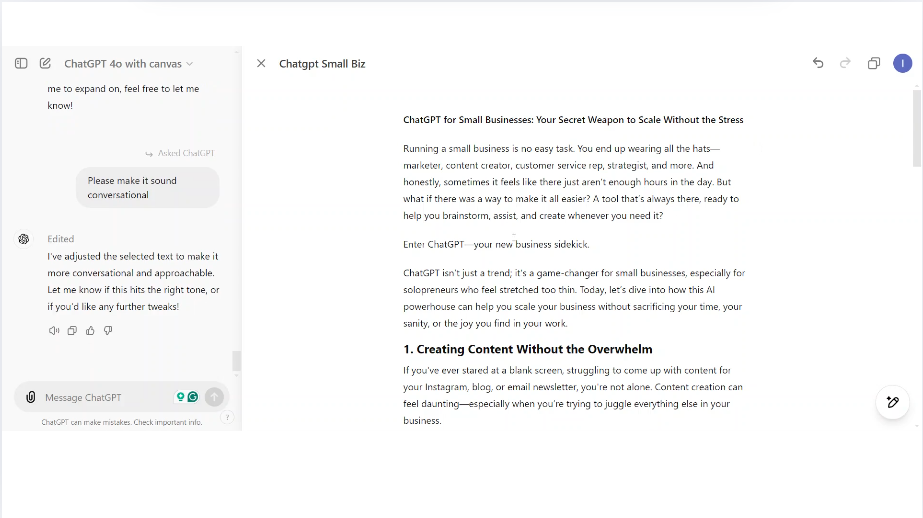
ChatGPT Canvas interface
This feature is especially useful for long-form content, like blog posts, podcasts, newsletters, or even course materials. Instead of going through a disorganized chat history filled with version after version, ChatGPT Canvas gives a streamlined approach so your creative process is smooth and efficient.
Why ChatGPT Canvas is a Game-Changer for Solopreneurs
ChatGPT Canvas has a lot of features that make it the perfect tool for solopreneurs juggling multiple roles. Here are some additional aspects that can make your content creation process even more seamless:
-
Real-Time Collaboration and Feedback: ChatGPT Canvas enables real-time feedback on your content. You can highlight specific sections and prompt ChatGPT to suggest improvements, which helps make sure your content is polished and professional.
Streamlined Editing Process: No more switching between different tools. Canvas has a dedicated workspace where you can make all your edits directly. This makes the editing process much more efficient and less of a mental load.
Version Control: With Canvas, you can easily track changes and revert to previous versions if needed. This is super helpful if you’re experimenting with different styles or content directions, and you can see previous ideas without any worry.
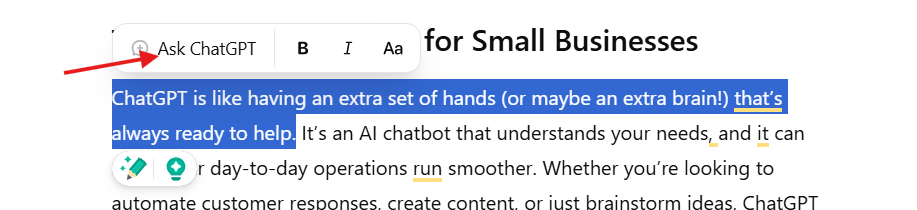
If you’re like most solopreneurs, you’re probably juggling a ton of different roles in your business. You might be a content creator one minute and a customer service rep the next, all while managing big-picture projects and strategy.
I know how valuable time and focus are, so when a tool comes along that can save you from the headaches of messy edits, it’s worth paying attention to.
With ChatGPT Canvas, you can:
Stay Organized: No more scrolling back and forth to find the right version of your content or worrying about losing track of changes. Everything happens in one place, giving you a clear overview.
Save Time: Since you can make edits in one dedicated space, you cut down on the back-and-forth, meaning you get to your final draft faster.
Collaborate with AI More Naturally: The Canvas feature allows you to interact with ChatGPT like a real writing assistant. Instead of going back and forth endlessly, you make direct changes and ask for new suggestions, all within the same workspace.
For example, let’s say you’re drafting a blog post. Normally, you’d have ChatGPT write something, and then you’d tweak parts of it, request changes, and wait for each new response to load in the chat thread.
It can be a lot, and sometimes the chat thread gets too cluttered.
With Canvas, all your edits and revisions happen in one space, like working in a Word document alongside an AI assistant.
How to Get Started with ChatGPT Canvas
For now, ChatGPT Canvas is available to Plus users as a beta feature, but it’s expected to roll out to free users soon. Here’s how to get started:
1️⃣ Train ChatGPT First: Before you dive into using Canvas and have it generate content for you, start by training ChatGPT about your brand. If you're following me on Instagram, you know how much I talk about the importance of getting ChatGPT aligned with your voice and style.
2️⃣ Switch to GPT-4 with Canvas: Once you’re ready, switch over to the “GPT-4 with Canvas” model (you’ll find it in the top left drop-down menu). From there, you can start creating and refining content directly in the Canvas feature.
3️⃣ Use Canvas for Long-Form Content: Start using Canvas when you work on things like blog posts, podcast scripts, email sequences, or even bigger projects like course creation. It’s a great place to brainstorm, refine, and finalize your drafts all in one place.
ChatGPT Canvas in Action
To give you an example, let’s say you’re working on an email sequence for a new product launch. You can open Canvas and have ChatGPT help you brainstorm ideas, draft each email, and then refine the copy, all in one seamless space.
You can tweak individual sentences, add new sections, and ask for improvements without losing track of your progress.
It’s like working side-by-side with a real-time AI collaborator, but everything stays neat and organized.
You can even adjust the length or reading level by simply clicking a button. Like this:
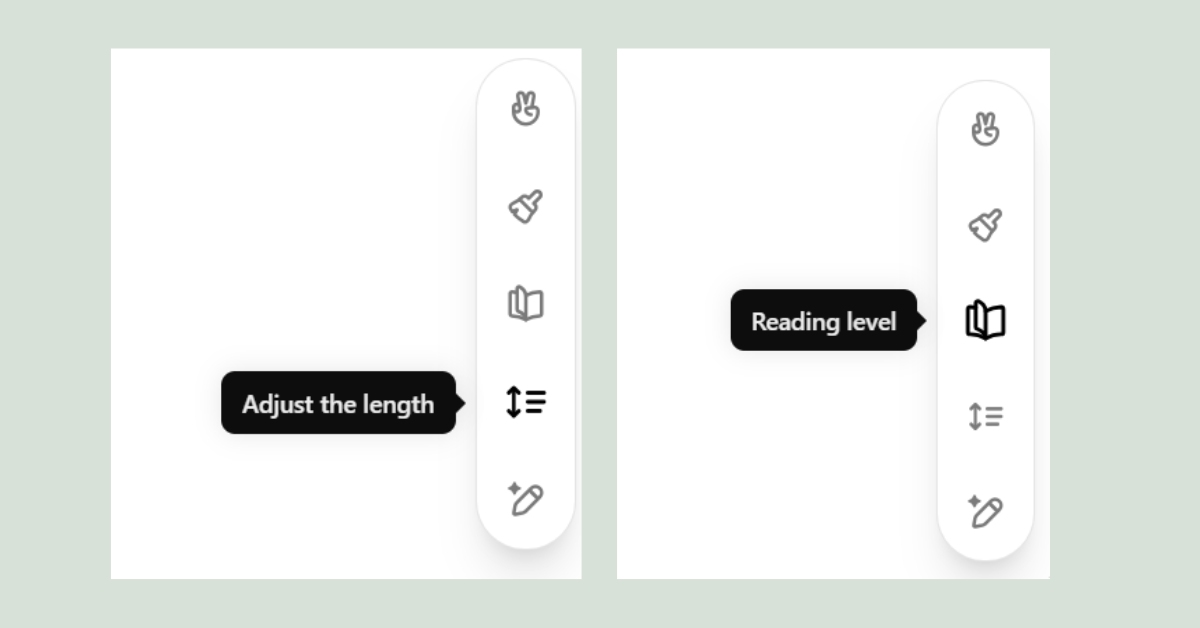
ChatGPT Canvas quick editing options
One of the things I’ve noticed when sharing this with members of The ChatGPT Solopreneur Club is that Canvas helps reduce overwhelm.
Some members told me they avoided asking for tweaks because they couldn’t be bothered to wait for everything to be retyped in chat. Now, they feel more comfortable making adjustments because it’s all happening in a single workspace.
Who Will Benefit Most from ChatGPT Canvas?
ChatGPT Canvas is perfect for anyone creating long-form content, such as bloggers, content creators, coaches, course creators, and solopreneurs who regularly need to refine their work.
If you’re tired of scrolling through long chat threads or dealing with version clutter, Canvas can simplify your workflow.
It’s also great if you love having an organized, visual workspace where you can see all your edits and changes at once.
How to Access ChatGPT Canvas
To access ChatGPT Canvas, simply select the “GPT-4 with Canvas” option from the drop-down menu in the top left of your ChatGPT interface.
Currently (November 2024), ChatGPT Canvas is only available to Plus users, but it is expected to roll out to free users after the beta phase.
ChatGPT Canvas is a great ChatGPT feature that could transform the way you collaborate with ChatGPT for content creation. If you’re tired of messy edits and endless chat threads, this ChatGPT feature could be just what you need to streamline your creative process and stay organized.

FAQs
1. What is ChatGPT Canvas?
ChatGPT Canvas is a feature that creates a special workspace within ChatGPT, allowing users to create, edit, and refine content without the clutter of regular chat threads. It’s like having a word processor right inside your ChatGPT session.
2. Who can use ChatGPT Canvas?
Right now (November 2024), it’s available to Plus users during the beta testing phase. It’s expected to be released to all users soon.
3. How is ChatGPT Canvas different from regular chat?
Unlike regular chat, Canvas allows you to make all your edits and revisions in a single workspace, eliminating the need to scroll through multiple responses and versions.
4. What kind of projects is ChatGPT Canvas best for?
Canvas is perfect for long-form content, like blog posts, email sequences, course creation, and more. It’s ideal if you need to make a lot of edits or revisions.
5. How do I switch to ChatGPT Canvas?
If you’re a Plus user, you can find the “GPT-4 with Canvas” option in the drop-down menu on the top left. Select it to start using Canvas for your projects.
Give your AI the context it actually needs
Your ChatGPT or Claude is missing the full picture.
FREE AI Brand Brief Generator
Answer 6 questions and get a strategically structured document with key info about your business, so ChatGPT/Claude has the context it needs to understand your business properly and give you more relevant, useful, business-specific help.
(It's like the briefing any AI should have before you start asking it to do anything for your business.)
P.S. Use it in ChatGPT, Claude, Gemini, NotebookLM, or wherever you work with AI.
Hey, dear! I'm Irena
I'm your fellow solopreneur and a mom of 3.
My goal? Simply put, I'm here to help you grow your amazing small biz, find your flow, and save time using the power of ChatGPT to make every minute count.
How do I do it? I'm bringing the power of ChatGPT into your business strategy, offering easy and affordable solutions that keep you ahead of the game.
"Irena has shown me an entirely new side of my business through ChatGPT. I'm super excited to explore more ways to use it for my business." - Reese
"Irena's guidance has not only simplified my daily tasks but also given me peace of mind. I can't thank her enough." - Rachel
Have a week of Instagram content done in less than an hour.
AI Content Flow Studio (only $7/month)
Your solution to Instagram overwhelm.
A simple AI-powered system that keeps your business visible, builds trust with your audience, and finally makes content creation feel doable — even on your busiest weeks.
Your AI is ready. Your content system is waiting.
Cancel anytime. Just see how this month feels.