How to Use ChatGPT to See What's Working (and What's Not) in Your Small Business

Running a small business means constantly learning, experimenting, and making strategic decisions. But how do you know if the strategies you're implementing are actually working? That's where tracking and analyzing the important numbers in your business comes in. And with the help of ChatGPT, analyzing your small business metrics can become easier, faster, and a lot less intimidating.
I’m Irena from The SoloGenius, and I know just how much work goes into running a small business. And tracking how your business is doing can sometimes be another layer of overwhelm.
So in this post, I’m going to show you how to use ChatGPT to easily analyze your business metrics and create actionable strategies, without the guesswork or headaches. We're talking about tracking Instagram metrics, Google Analytics data, email campaign performance, you name it. ChatGPT can help you better understand what's working and what isn't in your small business, so you can make informed decisions.
Related post: 5 Easy Ways ChatGPT Helps Small Business Owners Save 10+ Hours Weekly on Daily Tasks
Why Small Business Metrics Matter
Before we dive into how to use ChatGPT, let’s talk about why business metrics are so important. Metrics are basically the numbers that show how well different parts of your small business are performing. They tell you what’s working, what’s not, and where you need to improve.
Think of it like driving a car: your metrics are the dashboard. They tell you how fast you're going, whether you need gas, and if there’s something wrong under the hood. Without metrics, you’re driving blind, making decisions without really knowing what’s working.
By regularly reviewing your metrics (say, once a month) you can make informed decisions that move the needle and help your small business grow.
But if the word “metrics” feels overwhelming, don’t worry. You don’t have to be an analyst or a numbers person to make sense of it all - ChatGPT is here to help.

How to Use ChatGPT for Small Business Analysis
With ChatGPT, analyzing your business metrics is simple. You can upload reports, screenshots of metrics, or just paste the data you’ve gathered, and then let ChatGPT do the analysis for you.
Here’s a step-by-step guide to getting started:
1. Gather Your Metrics
First, you’ll want to gather your metrics. These could be:
Instagram metrics like engagement rates, follower growth, or which types of content get the most interaction.
Google Analytics data like website traffic, bounce rates, or which pages get the most views.
Email campaign metrics such as open rates, click-through rates, and conversions. (Don't worry, you have all of this in your email service provider like Mailerlite, Flodesk, etc.)
These are just a few examples, but feel free to pick metrics that make sense for your business. If you’re not sure what to track, start with something simple: How are your social posts performing? Are your website visitors sticking around? Are people opening your emails?
Or ask ChatGPT what metrics should you track. (After explaining how your business works.)
2. Upload Your Report
With ChatGPT, you can upload a report or even a screenshot of your metrics by clicking on the paperclip icon in the text box. This could be a PDF, a CSV file, or a screenshot from your dashboard. This is a quick way to get your data into ChatGPT for analysis.

3. Ask ChatGPT to Analyze the Metrics
Once your metrics are uploaded, you can ask ChatGPT to analyze them. Here are a few ChatGPT prompts for business analysis you could use:
“Act like a world-class social media manager. I’ve uploaded my Instagram metrics for the last 30 days. Please analyze these metrics and suggest improvements to increase engagement.”
"Review these email campaign metrics and provide strategies to improve open rates (e.g., subject line tweaks, optimal send times, etc.)."
"Analyze this Google Analytics report and recommend actions to increase website traffic (e.g., identify top-performing pages, keyword opportunities, etc.)."
ChatGPT will then provide a detailed analysis and suggest actionable next steps. For instance, it might recommend posting more during certain times of the day, tweaking your subject lines, or focusing on content that your audience seems to love.
Here's an example of ChatGPT's report for newsletter performance:
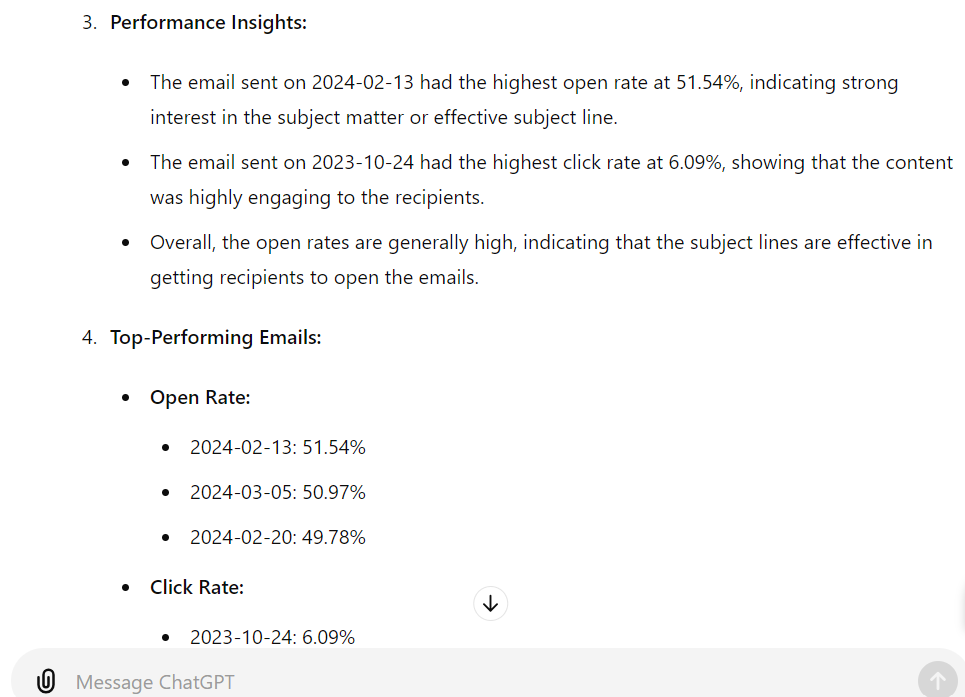
Example: ChatGPT analyzing newsletter metrics
Or even this graph that ChatGPT provided:
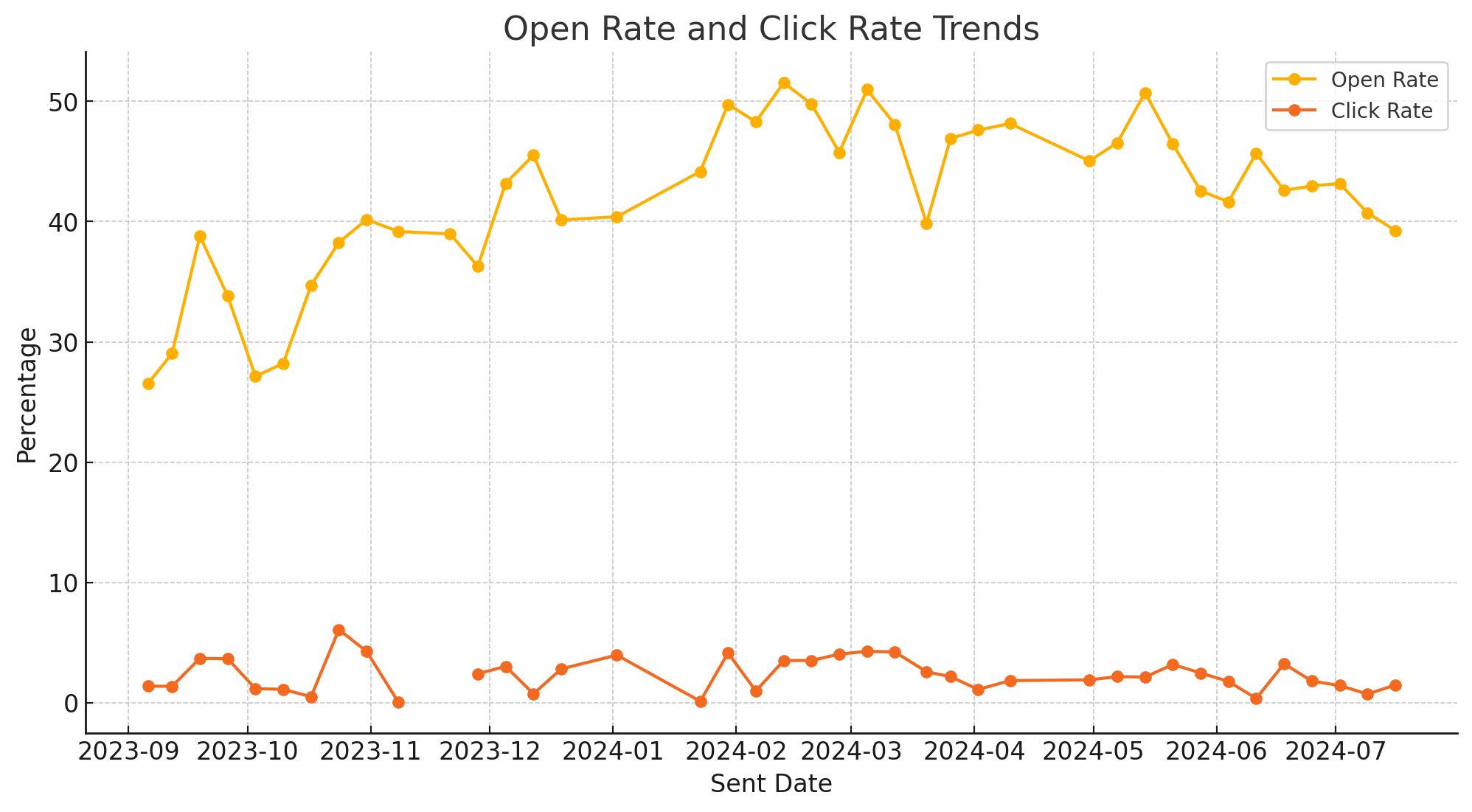
Example: ChatGPT graph report
Example: Analyzing Instagram Insights with ChatGPT
Let’s say you’re not seeing much engagement on your Instagram account. You could take a screenshot of your engagement metrics and type:
"Analyze this Instagram engagement report and suggest ways to increase engagement (e.g., improve post timing, content types that perform best, etc.)."
ChatGPT will look at the data and suggest things like posting during peak hours, focusing more on content types that got the most engagement, or even experimenting with different styles of captions.
Pro Tip: You can even ask ChatGPT to create an Excel or Google Sheet that you can use to track business metrics for your small business.
Why Use ChatGPT for Business Analysis?
The truth is, if you don’t know what metrics to track in your small business or even how to use the information you get, you’re not alone. Most solopreneurs and small business owners didn’t sign up to be the CEO, CFO, or COO when they first started their business.
The best part of using ChatGPT for business analysis is that it takes the guesswork out of decision-making. You don’t need to manually go through the data or worry about missing important details. ChatGPT can quickly turn what seems complex data into clear, actionable insights.
Plus, using ChatGPT to help you analyze your metrics can save you a ton of time. Instead of spending hours staring at a spreadsheet or a graph, you get a list of next steps that you can immediately implement. How great is that?
Ready to give it a try? Here’s what I suggest:
Pick one set of metrics you want to analyze this week - maybe your social media, email, or even membership if you have one.
Upload the data (or a screenshot) to ChatGPT and use one of the example prompts I provided above.
Go through the analysis and see what’s working (and stick to that) and where there’s room for improvement.
By using ChatGPT to analyze your data, you can make informed and strategic decisions that will help you grow your business, even if numbers aren’t really your thing.
FAQs
1. Can ChatGPT do business analysis?
Yes! ChatGPT can help small business owners analyze their business metrics, like social media, email campaigns, or website data, and provide actionable recommendations.
2. What metrics should I track as a small business owner?
It depends on your business,but start with the basics: social media engagement, website traffic, and email open rates. These metrics will give you a clear idea of how your audience interacts with your content.
3. How do I upload data to ChatGPT for analysis?
You can upload a report, a screenshot, or copy the data directly into ChatGPT using the paperclip icon in the text box.
4. How can ChatGPT help with business decisions?
ChatGPT makes analyzing your business numbers easy by quickly processing your data and suggesting actionable strategies. This saves you a ton of time and helps you make informed decisions.
5. Is ChatGPT suitable for financial analysis?
While ChatGPT can provide some insights for financial analysis, it’s best used for general business metrics. For deeper financial analysis, you may want to consult a professional.
Give your AI the context it actually needs
Your ChatGPT or Claude is missing the full picture.
FREE AI Brand Brief Generator
Answer 6 questions and get a strategically structured document with key info about your business, so ChatGPT/Claude has the context it needs to understand your business properly and give you more relevant, useful, business-specific help.
(It's like the briefing any AI should have before you start asking it to do anything for your business.)
P.S. Use it in ChatGPT, Claude, Gemini, NotebookLM, or wherever you work with AI.
Hey, dear! I'm Irena
I'm your fellow solopreneur and a mom of 3.
My goal? Simply put, I'm here to help you grow your amazing small biz, find your flow, and save time using the power of ChatGPT to make every minute count.
How do I do it? I'm bringing the power of ChatGPT into your business strategy, offering easy and affordable solutions that keep you ahead of the game.
"Irena has shown me an entirely new side of my business through ChatGPT. I'm super excited to explore more ways to use it for my business." - Reese
"Irena's guidance has not only simplified my daily tasks but also given me peace of mind. I can't thank her enough." - Rachel
Have a week of Instagram content done in less than an hour.
AI Content Flow Studio (only $7/month)
Your solution to Instagram overwhelm.
A simple AI-powered system that keeps your business visible, builds trust with your audience, and finally makes content creation feel doable — even on your busiest weeks.
Your AI is ready. Your content system is waiting.
Cancel anytime. Just see how this month feels.