How I Organize My Chats in ChatGPT: A Simple System for My Business

If you use ChatGPT for your business every day, your chat list can get out of control very fast.
You have one chat for Instagram ideas. Another for an offer you're creating. Three different conversations about your website. Something useful you know you talked about two weeks ago... somewhere.
Been there.
The simplest way I've found to organize ChatGPT is to use Projects for the main areas of my business.
I don't create a Project for every little task. I use them for areas I'm going to keep coming back to, where ChatGPT benefits from having the same context, files, instructions, and conversations available.
That gives me fewer places to look, better context when I start working, and much less of the “where on earth did I talk about this?” problem.
Here's how I organize mine.
The easiest way to organize ChatGPT chats: use Projects
Think of a ChatGPT Project as a workspace for one specific area of your business.
Inside one Project, you can keep:
related conversations
Project instructions
files and reference material
ongoing context about that part of your business
And this is where Projects become much more useful than simply organizing chats into folders.
If you're on ChatGPT Plus or Pro and you're using default memory, ChatGPT can use your broader memory and relevant conversations outside the Project too.
But when you're actually working inside a Project, ChatGPT prioritizes the chats and files from that Project.
So if I'm inside my SoloGenius Club Project talking about the Club, ChatGPT has a much more focused place to look first.
You can also choose project-only memory when you want that workspace to stay isolated from everything else.
I use that selectively (and there are definitely situations where I think it's the better choice).

How I decide what deserves its own ChatGPT Project
My rule is pretty simple:
If this is an area of my business I'm going to come back to again and again, and having its own context would make ChatGPT more useful, it probably deserves a Project.
For most solopreneurs, I would start with a few core types.
1. A general business or CEO Project
Mine is obviously for The SoloGenius. Yours would be for your own business.
This is my thinking space.
It's where I go when I'm brain dumping things like:
Am I going in the right direction?
Should I change this offer?
Why isn't this strategy working?
What should I focus on next?
Is this worth pursuing?
Can you help me think through this business decision?
This is where a lot of the bigger-picture thinking happens.
Because the Project is centered around the business itself, I can keep important brand and business context there and continue building on previous strategic conversations instead of explaining my entire business every time I have a new idea.
I think of this one almost like my CEO workspace.
2. A Content & Visibility Project
I like keeping content in its own Project because content has its own ongoing context.
This is where you might work on:
Instagram content
newsletters
blog posts
visibility ideas
messaging
content strategy
what's performing
what your audience is responding to
what you're promoting right now
And if you create content across several platforms, you can still keep all of that inside the same content workspace rather than creating a separate Project for Instagram, another for email, another for your blog, and so on.
The point is to make things easier to find. I don't want to create another filing system that needs its own filing system.
For me, content belongs together because all those platforms should be working toward the same business goals anyway.
3. Projects for specific offers or products
If I have an important offer I'm actively developing, selling, improving, or talking about regularly, I usually want it to have its own Project.
For example, I have one Project for The SoloGenius Club, and I might have another for something like my AI Brand Foundation Kit.
(Side note: this is exactly why I created the AI Brand Foundation Kit. It creates the business and brand context documents you can give to a Project — or really any AI tool — so you don't have to spend forever teaching it your business from scratch.)
That gives me one place for everything related to that offer:
positioning
sales messaging
customer feedback
ideas
launch planning
metrics
product updates
emails
content
research
decisions I've already made
This is also where I would plan a launch.
I wouldn't create another Project called “SoloGenius Club Launch.”
The launch belongs to the Club, so I'd keep it in the SoloGenius Club Project.
Same thing if I were launching the AI Brand Foundation Kit. I'd plan that inside the AI Brand Foundation Kit Project.
Keeping everything connected to the actual offer makes much more sense to me than creating temporary Projects every time something happens.
And when something changes, I can update the instructions, files, metrics, or other relevant information inside that one workspace.
4. One Project for each client
If you work with clients one-on-one, I would give every client their own Project.
This could work especially well if you're a:
social media manager
virtual assistant
consultant
coach
designer
copywriter
strategist
service provider
Each client's business has its own voice, goals, history, files, preferences, and work.
Keeping Client A and Client B inside the same Project would make no sense.
This is also one situation where project-only memory can be really useful.
ChatGPT doesn't necessarily need everything it knows about your business when you're working on a client's business.
You probably want that Project focused on that client.
So how many ChatGPT Projects do you actually need?
There isn't one magic number.
It depends on how your business works.
But if you're a solopreneur and you're starting from scratch, I would probably begin with:
Your Business / CEO
Content & Visibility
Important Offers or Products
Individual Clients, if you have them
And stop there.
You can always add another Project when you notice that one area of your work keeps coming up often enough to deserve its own space.
You don't need to sit down one afternoon and create 27 Projects just because ChatGPT lets you.
(Please don't turn organizing ChatGPT into another full-time job.)
How I organize the chats inside each Project
Projects solve one part of the organization problem.
You can still end up with 75 random conversations inside one Project if you're not a little intentional about your chats.
My rule here is also very simple.
If I'm continuing the same piece of work, I continue the conversation.
If we're working on a blog post and I come back tomorrow to revise the same blog post, I'll usually go back to that chat.
If I'm talking about something else, I start a new one.
So inside my Content & Visibility Project, I wouldn't use one endless conversation for:
“Help me write today's Instagram post.”
Then three days later:
“Let's completely rethink my newsletter strategy.”
Then:
“What should I write on my sales page?”
Those are separate pieces of work, so I want separate chats.
It makes them much easier to find later too.
And sometimes a chat just gets tired
This is something I've noticed after using AI heavily for years.
Sometimes you're technically still working on the same thing, but the conversation has become so long that you're spending more time correcting it.
It starts pulling in old directions you don't need anymore.
You're tweaking the response much more than you did at the beginning.
That's usually my sign that the chat is tired.
I start a fresh one.
The Project still gives ChatGPT access to the relevant Project context, so starting over doesn't necessarily mean starting from zero.
Sometimes a fresh chat is exactly what the work needs.
How to set up a ChatGPT Project
The basic setup itself is simple.
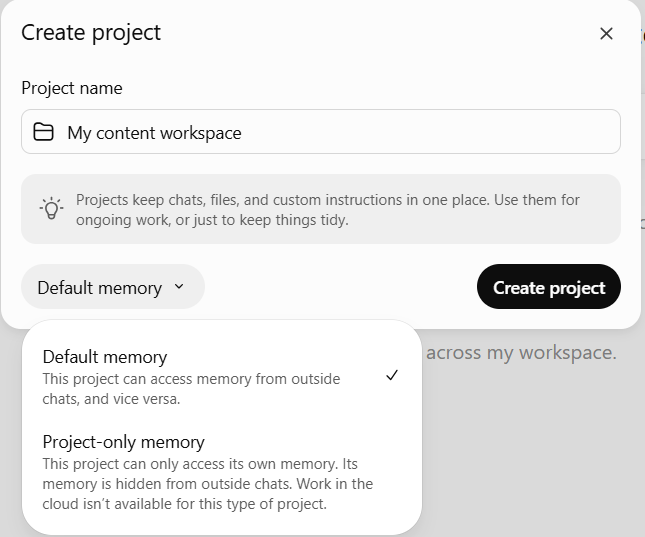
Step 1: Create the Project
Create a new Project and give it a clear name based on the area of your business it represents.
Keep the naming obvious.
You're going to be looking for this six months from now. This isn't the place for a clever name you'll forget the meaning of.
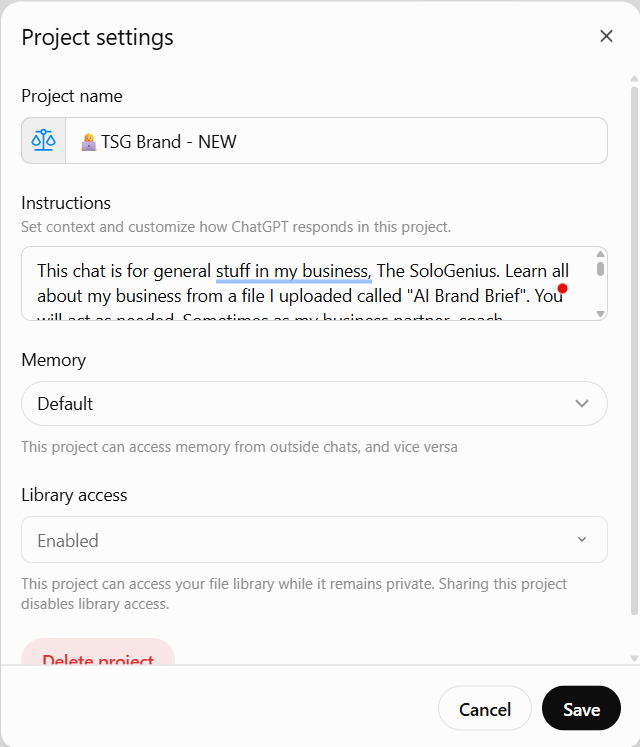
Step 2: Add Project instructions
Tell ChatGPT what this Project is for and anything it should consistently know about how you want to work there.
For a content Project, for example, those instructions might include:
who your audience is
what you're trying to achieve with your content
your content strategy
your brand voice
things you don't want your content to sound like
your main platforms
your offers
For an offer Project, the instructions would be more specific to that offer.
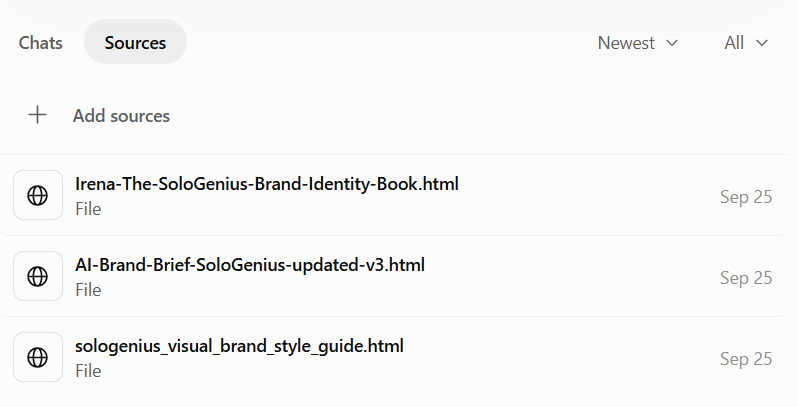
Step 3: Add the knowledge it actually needs
You can also add useful files and reference material.
Again, I wouldn't upload your entire digital life.
Add the things ChatGPT is realistically going to need while you're working in that Project.
For an offer, that might be your offer details, customer research, positioning, previous sales copy, or results.
For a client, it might be their brand guide, audience information, services, content strategy, and important working documents.
Step 4: Move relevant existing chats into the Project
If you've already had useful conversations about that area of your business, move the eligible chats into the new Project.
They become much easier to find, and they can become part of the context available inside that workspace.
Step 5: Keep training the Project as the work changes
This is something people sometimes forget.
Your business changes.
Your offers change.
Your positioning changes.
You learn things.
You get new data.
So the context you've given ChatGPT shouldn't stay frozen forever either.
When something important changes, update your instructions or knowledge.
If you've learned something significant about your audience, add it.
If your offer has changed, update it.
If you've tested something and now know what works better, give ChatGPT that information.
This is how your Project becomes more useful over time.
(And yes, I could write an entire article about how I train my Projects in ChatGPT and Claude. Actually... I probably will.)
Default memory or project-only memory?
This is one of the more useful choices to understand.
With default memory, ChatGPT can use your broader memory and, depending on your plan, relevant conversations outside the Project too.
On Plus and Pro, ChatGPT also prioritizes conversations and files from the Project you're currently working in.
That's what I want for most of my own business Projects.
My general SoloGenius knowledge is still useful whether I'm working on content, my membership, or one of my products.
But there are times when I want stronger boundaries.
That's what project-only memory is for.
With project-only memory, ChatGPT can use conversations from inside that Project, but it doesn't pull conversations or saved memories from outside it.
Client Projects are a good example.
If I'm working on Jane's business, I probably want Jane's Project focused on Jane.
I don't need ChatGPT pulling in information from The SoloGenius or another client's work.
So ask yourself whether broader context helps or creates noise.
That should tell you which memory setting makes more sense.
What if you use Claude too?
I use Projects for essentially the same organizational reason in Claude: to keep one area of work, its instructions, conversations, and knowledge together.
There is one important difference in how memory works.
In Claude, each Project has its own separate memory space and dedicated project summary.
Claude's general memory from your non-project conversations stays separate.
So if you're working inside a Claude Project, that Project is its own focused memory space rather than automatically pulling from everything Claude knows about you elsewhere.
The organization system itself transfers really well:
business → content → offers/products → individual clients
Which is useful if, like me, you work in more than one AI tool and don't want to invent a completely different organization system for each one.
Want a dedicated content workspace inside ChatGPT and/or Claude?
This is actually one of the first things I teach you inside the AI Content Flow Studio.
We start by setting up a dedicated content workspace inside the AI tool you already use — ChatGPT or Claude — and giving it the context it needs about your business, audience, voice, offers, and content strategy.
Then we build on that foundation.
You also get ready-to-use content templates, hooks, a prompting system, monthly content resources, and a structure that helps you actually create the content your business needs without starting with a blank chat every single time.
So you have the workspace.
You have the context.
You have the prompts, hooks, and templates.
And you know what to do with all of it.
Explore the AI Content Flow Studio →
Frequently Asked Questions
What is the best way to organize chats in ChatGPT?
For ongoing business work, I recommend using Projects to group related chats, files, instructions, and context together.
Create Projects around major areas you return to regularly instead of making a separate Project for every small task.
Can I move old ChatGPT chats into a Project?
Yes. Eligible existing conversations can be moved into a Project.
Once moved, they use that Project's instructions and file context.
Can ChatGPT remember other chats inside a Project?
Yes.
With default memory on Plus and Pro, ChatGPT can use broader memory and relevant conversations outside the Project too, while prioritizing the chats and files inside the Project you're currently working in.
If you choose project-only memory, context stays within that Project.
Does Claude use my general memory inside a Project?
Claude keeps a separate memory space and dedicated summary for each Project.
Its general memory from non-project conversations stays separate, which means each Project remains its own focused context.
Can I use Skills inside a ChatGPT or Claude Project?
Yes.
In Claude, Skills work across Claude, including alongside Projects.
Your Project can hold the ongoing context for your business, offer, client, or content system, while a Skill gives Claude a repeatable process to follow for a particular task.
For example:
Project = everything Claude should know about your content and business
Skill = exactly how you want it to create a blog post
You can use the same idea in ChatGPT if Skills are available on your account.
And here's one slightly confusing thing.
OpenAI's current Help Center documentation still lists Personal Skills as available to eligible Business, Enterprise, Healthcare, and Edu users.
But I'm on Plus, and I already have Personal Skills. I can create them, upload them, and ChatGPT can read and use them.
(So yes, it looks like the product and the Help Center aren't completely caught up with each other.)
If Skills are available on your account, you can use them as reusable workflows alongside the context you've built into your Projects.
What is project-only memory in ChatGPT?
Project-only memory keeps the Project isolated.
Chats inside it can reference other conversations within that Project, while conversations and saved memories outside the Project aren't referenced.
This is great for client work or anywhere you want tighter context boundaries.
How many ChatGPT Projects should I create for my business?
It depends on your business.
For most solopreneurs, I would start with:
a general business/CEO Project
a Content & Visibility Project
Projects for important offers or products
one Project per client, if you work with clients
Then add more when you see the need for them.
If something still fits logically inside one of those Projects, I'd keep it there.
Give your AI the context it actually needs
Your ChatGPT or Claude is missing the full picture.
FREE AI Brand Brief Generator
Answer 6 questions and get a strategically structured document with key info about your business, so ChatGPT/Claude has the context it needs to understand your business properly and give you more relevant, useful, business-specific help.
(It's like the briefing any AI should have before you start asking it to do anything for your business.)
P.S. Use it in ChatGPT, Claude, Gemini, NotebookLM, or wherever you work with AI.
Hey, dear! I'm Irena
I'm your fellow solopreneur and a mom of 3.
My goal? Simply put, I'm here to help you grow your amazing small biz, find your flow, and save time using the power of ChatGPT to make every minute count.
How do I do it? I'm bringing the power of ChatGPT into your business strategy, offering easy and affordable solutions that keep you ahead of the game.
"Irena has shown me an entirely new side of my business through ChatGPT. I'm super excited to explore more ways to use it for my business." - Reese
"Irena's guidance has not only simplified my daily tasks but also given me peace of mind. I can't thank her enough." - Rachel
Have a week of Instagram content done in less than an hour.
AI Content Flow Studio (only $7/month)
Your solution to Instagram overwhelm.
A simple AI-powered system that keeps your business visible, builds trust with your audience, and finally makes content creation feel doable — even on your busiest weeks.
Your AI is ready. Your content system is waiting.
Cancel anytime. Just see how this month feels.