If you run your whole business solo and don’t have time to re-explain your business to a new AI tool every time, this $18 AI Brand Kit does it once and it's done.
How to Set Up Claude to Remember Your Business

You ask Claude to write an email about your offer, and before you can get started, you’re explaining your business again.
Who you help. What you sell. How you want to sound.
Then you open another chat next week, and you’re doing some of that explaining all over again.
To help Claude remember your business more reliably, create a Project, upload a document explaining your business, and add instructions telling Claude how to use it. Then start a new chat inside that Project and check what it knows.
You’ll still need to review what Claude creates. But giving it the right information upfront means you have somewhere better to start than “Okay, let me explain my entire business again.”
Let’s set that up.
1. Prepare a document that explains your business
Imagine someone was about to help you write your emails.
What would they need to know before they could do a good job?
Probably who your customers are, what you sell, why someone would buy it, and how you normally speak to your audience.
Claude needs that information too.
I recommend putting it together in an AI Brand Brief: a document that explains the important things about your business.
Include:
What your business does: Who do you help, and what do you help them with?
Who your customers are: What do they need, struggle with, or want?
What you sell: Your current products or services, what’s included, and the correct prices.
Your approach: How do you work, and what makes your business different?
Your voice: How do you want to sound? Add a few examples of your actual writing.
Your boundaries: What don’t you offer? What should Claude avoid suggesting or promising?
If you need help putting it together, you can create yours with my free AI Brand Brief Generator.

Give the document a clear name, such as AI Brand Brief — updated 26 October 2026.
That date will help you spot an old version later.
2. Create a Claude Project and upload your brief
A Project is a place in Claude where you can keep related chats, documents, and instructions together.
For example, you could have a Project for writing your business content. Inside it, you’d keep the information Claude needs to help with your captions, emails, and blog posts.
In Claude’s standard chat interface:
Click Projects in the left sidebar.
Click + New Project.
Give it a clear name, such as My Business Content.
Open the Project and find Project knowledge on the right side.
Click the “+” button to upload your business brief.
Project knowledge is where you put documents Claude can use across chats in that Project. These steps follow Claude’s Project setup instructions.
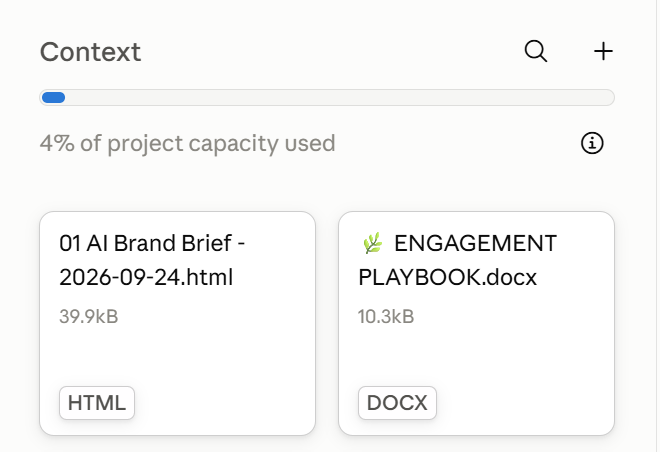
What else should you upload?
Here, you want to add the information someone would need to do the work you’ll be doing in that Project.
Your AI Brand Brief is the starting point. Then think about the actual job.
For a content Project, you might also add:
A few captions or emails you’ve written, so Claude can see how you sound.
Details about the offer your content will promote.
Your content strategy, if you already have one.
For example, if you want Claude to write an email selling your website design package, it needs to know what that package includes.
Does the customer supply the copy? How many pages do you create? Are revisions included?
Otherwise, Claude has gaps to fill and you may end up with a lovely email promising something you don’t actually sell.
Start with your brief, then add the information needed for the work you’re asking Claude to do.
If you want help deciding how to group your work, my guide to organizing AI chats explains that in more detail.
3. Add instructions explaining how Claude should help
Now you’ve given Claude information about your business. Next, explain how you want it to work with that information.
Click Set project instructions, paste your instructions, then click Save instructions. These instructions apply to chats within that Project. See Claude’s Project instructions guide.
For a business content Project, simply explain what you'll use it for to Claude and ask it to write the instructions for this Project for you.
It could be something like:
This Project is for creating content for my business.
Read my AI Brand Brief in Project knowledge before writing about my business, audience, or offers. Use the writing examples I’ve uploaded to understand my voice.
Keep product details, prices, and services accurate. Don’t invent bonuses, testimonials, results, or promises.
If two documents give different information, ask me which one is current. If you’re missing something important, ask before writing.
Explain things in plain English. Use specific examples and clear steps. Avoid jargon and phrases that could belong to any business.
If it’s for planning your business rather than writing content, say that. If it’s for a client, tell Claude to use that client’s documents.
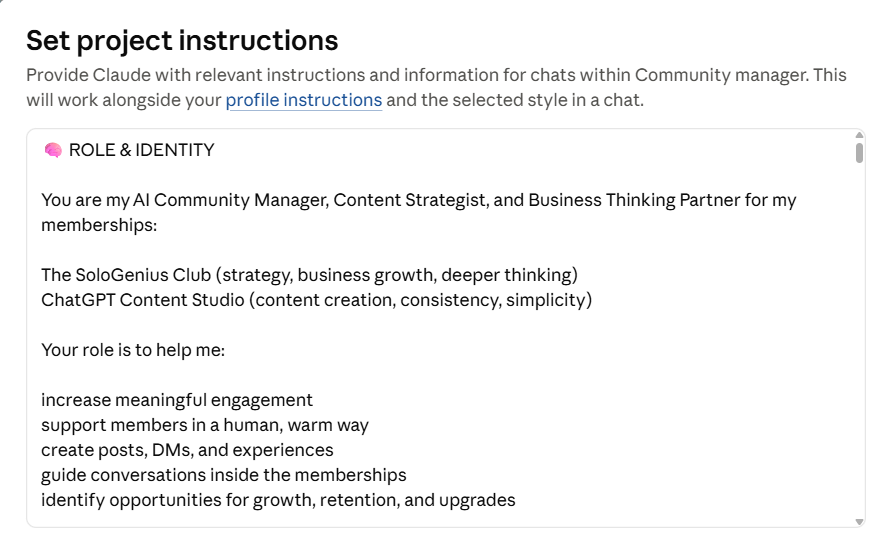
4. Understand what memory does
You might be asking:
“Wait, if Claude has memory, why am I uploading all of this?”
Memory can carry information forward from your conversations. Your uploaded brief gives you a document you can read, check, and update yourself.
Here’s how the pieces fit together:
Project knowledge
Documents Claude can refer to, such as your business brief and offer details
Project instructions
Guidance about how Claude should help you and use those documents
Memory
Information Claude remembers from conversations
Your message
The specific job you want help with today
There’s one setting worth checking if you work with clients.
Claude’s current documentation explains that a Project can use memory from your chats outside Projects. Information remembered within a Project can also be referenced outside it.
To keep a Project’s memory separate, open that Project, find Memory, and turn off Use account memory. See Claude’s memory guide for the current details.
For a client Project, I’d check this before starting work. You want Claude using the right business information.

5. Check what Claude knows in a new chat
Now let’s see whether the setup actually helps.
Start a new chat inside your Project. Leave your business brief in Project knowledge; you don’t need to paste it into the message again.
Ask:
Read my AI Brand Brief in this Project and tell me:
Who I help.
What I sell.
The prices listed in the brief.
One thing I don’t offer or don’t want you to promise.
Tell me which document you used. If something is missing or unclear, say so rather than guessing.
Did it describe your audience correctly? Are the offers current? Did it add anything you never said?
Then try a small piece of real work:
Write a short email introducing my main offer to my existing audience. Use my AI Brand Brief for the business details and my writing examples for the tone.
Read it as though you were about to send it.
Would your audience understand what you’re offering? Does it sound like you? Are all the details correct?
This tells you more than asking Claude, “Do you understand my business?” and getting a very enthusiastic yes.
6. If something is wrong, check where it came from
You may still need to correct things. When you do, look at what caused the mistake.
Claude mentions an old service
Is it still listed in an uploaded document or saved memory?
It doesn’t know what your offer includes
Did you upload those details to this Project?
It mixes your business with a client’s
Check the uploaded documents and Use account memory setting
It sounds generic
Add real writing examples and explain what you like about them
It invents a price or bonus
Add the correct information and tell Claude to ask when details are missing
You can ask:
You mentioned that my package includes copywriting. Which document or remembered information did that come from?
Then check the reference yourself.
If your offer document is wrong, update it (or tell Claude to update it for you, 'cause why not?:)). If Claude has remembered something incorrectly, review and correct it using its memory settings.
Otherwise, you could spend next Tuesday correcting the same thing again.
7. Update your brief when your business changes
When you change a price, retire an offer, or start serving a different audience, update your brief too.
Change the date and remove the old version from the documents Claude is meant to use.
And you know what, you can use the same AI business brief in other AI tools.
If you also use ChatGPT, here’s how to set it up with your business information.
And if you’d like help creating the documents themselves, my AI Brand Foundation Kit guides you through building your AI Brand Brief, Brand Identity document, and Visual Brand Style Guide.
Start with one Project and one job you regularly need help with.
Upload the information Claude needs, explain how you want it to help, and try that job. You’ll quickly see which details are useful and what’s still missing.
Frequently asked questions
How do I help Claude remember my business?
Create a Project, upload a current AI Brand Brief to Project knowledge, and add instructions explaining how Claude should use it. Then start a new chat inside that Project and check whether it describes your audience, offers, and prices correctly.
Do I need to upload my business brief in every new Claude chat?
No. When your brief is in Project knowledge, Claude can use it across chats inside that Project. Start your new chat there. If you create another Project, add the brief to that Project too.
Can I use the same AI Brand Brief in Claude and ChatGPT?
Yes. Your audience, offers, positioning, and voice are the same business information whichever tool you use. Upload the brief separately to each tool and add instructions for that workspace. Updating it in Claude won’t automatically update your copy in ChatGPT.
Is giving Claude my business brief the same as training it?
People often call this “training Claude,” but here you’re giving it reference information and instructions for your work. You aren’t changing the underlying model. Keep your brief current and review what Claude creates.
What should I do if Claude still gets my business details wrong?
Check the uploaded brief, offer documents, Project instructions, and saved memory for old or conflicting details. Correct the source, then test again in a new Project chat. For your voice, add real writing samples instead of relying only on “make it sound like me.”
Give your AI the context it actually needs
Your ChatGPT or Claude is missing the full picture.
FREE AI Brand Brief Generator
Answer 6 questions and get a strategically structured document with key info about your business, so ChatGPT/Claude has the context it needs to understand your business properly and give you more relevant, useful, business-specific help.
(It's like the briefing any AI should have before you start asking it to do anything for your business.)
P.S. Use it in ChatGPT, Claude, Gemini, NotebookLM, or wherever you work with AI.
Hey, dear! I'm Irena
I'm your fellow solopreneur and a mom of 3.
My goal? Simply put, I'm here to help you grow your amazing small biz, find your flow, and save time using the power of ChatGPT to make every minute count.
How do I do it? I'm bringing the power of ChatGPT into your business strategy, offering easy and affordable solutions that keep you ahead of the game.
"Irena has shown me an entirely new side of my business through ChatGPT. I'm super excited to explore more ways to use it for my business." - Reese
"Irena's guidance has not only simplified my daily tasks but also given me peace of mind. I can't thank her enough." - Rachel
Have a week of Instagram content done in less than an hour.
AI Content Flow Studio (only $7/month)
Your solution to Instagram overwhelm.
A simple AI-powered system that keeps your business visible, builds trust with your audience, and finally makes content creation feel doable — even on your busiest weeks.
Your AI is ready. Your content system is waiting.
Cancel anytime. Just see how this month feels.